2.5 跨栈对齐视图
原文链接: https://developer.apple.com/documentation/swiftui/aligning-views-across-stacks
2.5 跨栈对齐视图
创建自定义对齐方式,并用它在多个栈之间对齐视图。
概述
当你把多个栈嵌套在一起时,可能希望这些栈中的某些特定项目彼此对齐。默认情况下,你为某个栈指定的对齐方式只作用于该栈的子视图。要让位于嵌套栈中的子视图彼此对齐,请定义一种自定义对齐方式,把它指定给外层视图,并使用 alignment guide 修饰符来标识需要对齐的特定视图。
从默认的居中对齐开始
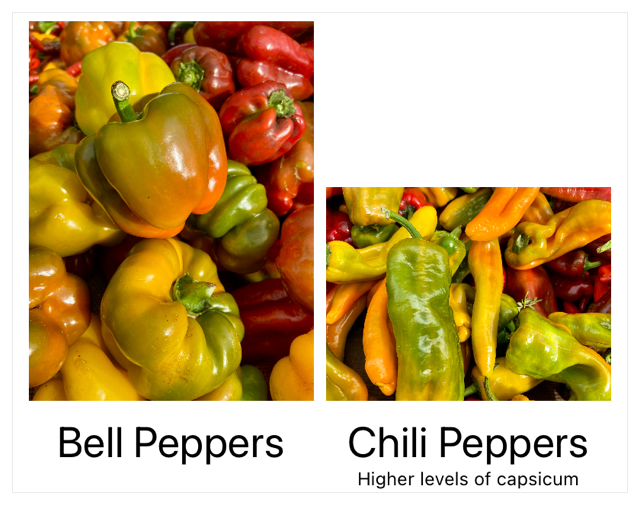
为了说明如何跨栈对齐项目,下面这个视图展示了一个水平栈,它包裹着两个子视图数量不同的嵌套垂直栈。外层的 HStack 没有定义对齐方式,因此默认使用 center。
 1
 2
 3
 4
 5
 6
 7
 8
 9
10
11
12
13
14
15
16
17
18
19
20
21
22
| struct ImageRow: View {
var body: some View {
HStack {
VStack {
Image("bell_peppers")
.resizable()
.scaledToFit()
Text("Bell Peppers")
.font(.title)
}
VStack {
Image("chili_peppers")
.resizable()
.scaledToFit()
Text("Chili Peppers")
.font(.title)
Text("Higher levels of capsicum")
.font(.caption)
}
}
}
}
|
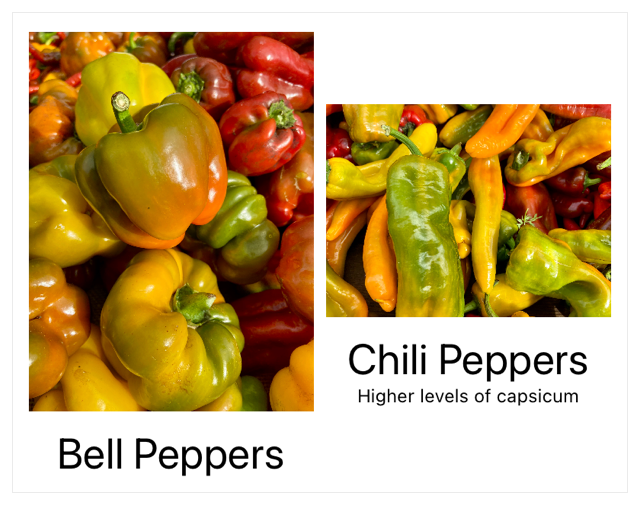
下图显示嵌套垂直栈中的内容在栈的中央对齐。这些垂直栈内部的子元素(例如每个图像下方的标题)彼此并不对齐。
定义自定义对齐方式
要创建新的垂直对齐参考线,请为 VerticalAlignment 扩展一个新的静态属性作为你的参考线。参考线的命名应与它对齐的对象相关,以便于使用。下面的示例把这个参考线的默认值设为底部定位:
 1
 2
 3
 4
 5
 6
 7
 8
 9
10
11
12
13
14
| extension VerticalAlignment {
/// 用于图像标题的自定义对齐方式。
private struct ImageTitleAlignment: AlignmentID {
static func defaultValue(in context: ViewDimensions) -> CGFloat {
// 如果没有设置参考线,默认采用底部对齐。
context[VerticalAlignment.bottom]
}
}
/// 用于对齐标题的参考线。
static let imageTitleAlignmentGuide = VerticalAlignment(
ImageTitleAlignment.self
)
}
|
指定并应用自定义对齐方式
要使用这条对齐参考线,请把它指定给包围着你想对齐的那些视图的父视图。下面的示例把 imageTitleAlignmentGuide 指定为这个水平栈的对齐方式:
 1
 2
 3
 4
 5
 6
 7
 8
 9
10
11
12
13
14
15
16
17
18
19
20
21
22
23
24
25
| struct RowOfAlignedImages: View {
var body: some View {
HStack(alignment: .imageTitleAlignmentGuide) {
VStack {
Image("bell_peppers")
.resizable()
.scaledToFit()
Text("Bell Peppers")
.font(.title)
}
VStack {
Image("chili_peppers")
.resizable()
.scaledToFit()
Text("Chili Peppers")
.font(.title)
Text("Higher levels of capsicum")
.font(.caption)
}
}
}
}
|
这两个垂直栈现在按栈的底部对齐,使用的是你为自定义参考线指定的默认值。
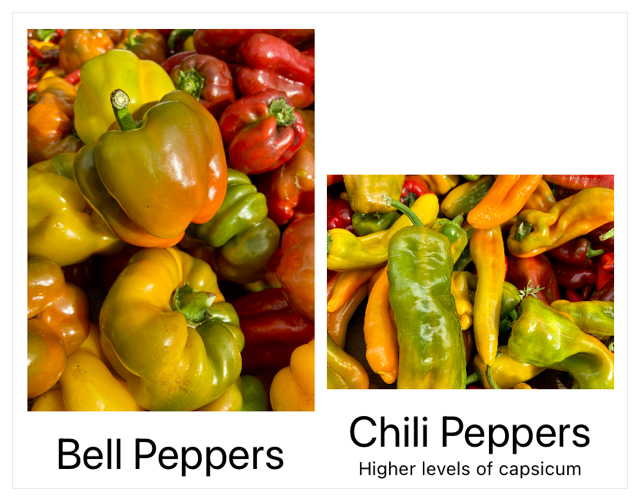
当你在某个栈上定义对齐方式后,它会透传到所包含的子视图中。在嵌套的 VStack 实例内部,对需要对齐的视图应用 alignmentGuide(_:computeValue:),并使用你为 HStack 定义的自定义参考线。
 1
 2
 3
 4
 5
 6
 7
 8
 9
10
11
12
13
14
15
16
17
18
19
20
21
22
23
24
25
26
27
28
29
30
31
| struct RowOfAlignedImages: View {
var body: some View {
HStack(alignment: .imageTitleAlignmentGuide) {
VStack {
Image("bell_peppers")
.resizable()
.scaledToFit()
Text("Bell Peppers")
.font(.title)
.alignmentGuide(.imageTitleAlignmentGuide) { context in
context[.firstTextBaseline]
}
}
VStack {
Image("chili_peppers")
.resizable()
.scaledToFit()
Text("Chili Peppers")
.font(.title)
.alignmentGuide(.imageTitleAlignmentGuide) { context in
context[.firstTextBaseline]
}
Text("Higher levels of capsicum")
.font(.caption)
}
}
}
}
|
alignment guide 修饰符的闭包返回 firstTextBaseline,它把各个标题的基线对齐到 imageTitleAlignmentGuide 这条对齐参考线上。