3.3.9 库与 API
原文链接: https://kotlinlang.org/docs/kotlin-tour-intermediate-libraries-and-apis.html
3.3.9 库与 API
要充分利用 Kotlin,请使用现成的库和 API,这样你就能把更多时间花在写代码上,而不是重复造轮子。
库分发可复用的代码,用来简化常见任务。库内部有包和对象,用来把相关的类、函数和工具组织在一起。库以函数、类或属性的形式对外暴露 API(应用程序编程接口),供开发者在自己的代码中使用。
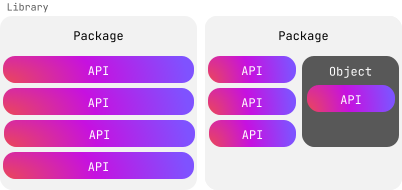
我们来看看用 Kotlin 能做些什么。
标准库
Kotlin 有一个标准库,提供基础类型、函数、集合和工具,让你的代码简洁而富有表现力。标准库的很大一部分(kotlin 包中的所有内容)在任何 Kotlin 文件中都可以直接使用,无需显式导入:
 1
 2
 3
 4
 5
 6
 7
 8
 9
10
| fun main() {
val text = "emosewa si niltoK"
// Use the reversed() function from the standard library
val reversedText = text.reversed()
// Use the print() function from the standard library
print(reversedText)
// Kotlin is awesome
}
|
不过,标准库中有些部分需要先导入才能在代码中使用。例如,如果你想使用标准库的时间测量功能,就需要导入 kotlin.time 包。
在文件顶部添加 import 关键字,后面跟上你需要的包:
星号 * 是通配符导入,表示让 Kotlin 导入该包中的所有内容。你不能对伴生对象使用星号 *。相反,你需要显式声明想要使用的伴生对象成员。
例如:
 1
 2
 3
 4
 5
 6
 7
 8
 9
10
| import kotlin.time.Duration
import kotlin.time.Duration.Companion.hours
import kotlin.time.Duration.Companion.minutes
fun main() {
val thirtyMinutes: Duration = 30.minutes
val halfHour: Duration = 0.5.hours
println(thirtyMinutes == halfHour)
// true
}
|
这个示例:
- 导入了
Duration 类,以及它伴生对象中的 hours 和 minutes 扩展属性。 - 使用
minutes 属性把 30 转换成 30 分钟的 Duration。 - 使用
hours 属性把 0.5 转换成 30 分钟的 Duration。 - 检查这两个时长是否相等并打印结果。
动手之前先搜索
在决定自己写代码之前,先查一下标准库,看看你要找的东西是否已经存在。下面列出了一些标准库已经为你提供了大量类、函数和属性的领域:
要了解标准库中还有哪些内容,可以浏览它的 API 参考。
Kotlin 库
标准库涵盖了许多常见用法,但也有一些场景它并不涉及。幸运的是,Kotlin 团队和社区的其他成员开发了种类繁多的库来补充标准库。例如,kotlinx-datetime 可以帮助你在不同平台上管理时间。
你可以在我们的搜索平台上找到有用的库。要使用它们,你需要做一些额外的工作,例如添加依赖或插件。每个库都有对应的 GitHub 仓库,其中有如何把它加入你的 Kotlin 项目的说明。
添加库之后,你就可以导入其中的任何包。下面是一个导入 kotlinx-datetime 包并在纽约查询当前时间的示例:
 1
 2
 3
 4
 5
 6
 7
 8
 9
10
| import kotlinx.datetime.*
fun main() {
val now = Clock.System.now() // Get current instant
println("Current instant: $now")
val zone = TimeZone.of("America/New_York")
val localDateTime = now.toLocalDateTime(zone)
println("Local date-time in NY: $localDateTime")
}
|
这个示例:
- 导入
kotlinx.datetime 包。 - 使用
Clock.System.now() 函数创建一个包含当前时间的 Instant 类实例,并把结果赋给 now 变量。 - 打印当前时间。
- 使用
TimeZone.of() 函数查找纽约所在的时区,并把结果赋给 zone 变量。 - 在包含当前时间的实例上调用
.toLocalDateTime() 函数,并以纽约时区作为参数。 - 把结果赋给
localDateTime 变量。 - 打印按纽约时区调整后的时间。
提示: 要更详细地了解这个示例用到的函数和类,请参阅 API 参考。
选择启用 API
库的作者可能会把某些 API 标记为需要先选择启用,才能在代码中使用。他们通常在 API 仍在开发中、将来可能发生变化时这样做。如果你没有选择启用,就会看到这样的警告或错误:
1
| This declaration needs opt-in. Its usage should be marked with '@...' or '@OptIn(...)'
|
要选择启用,请写 @OptIn,后面的圆括号中包含用来给该 API 分类的类名,类名之后跟两个冒号 :: 和 class。
例如,标准库中的 uintArrayOf() 函数属于 @ExperimentalUnsignedTypes,如 API 参考中所示:
1
2
| @ExperimentalUnsignedTypes
inline fun uintArrayOf(vararg elements: UInt): UIntArray
|
在你的代码中,选择启用看起来是这样的:
1
| @OptIn(ExperimentalUnsignedTypes::class)
|
下面是一个选择启用后使用 uintArrayOf() 函数创建无符号整数数组并修改其中某个元素的示例:
 1
 2
 3
 4
 5
 6
 7
 8
 9
10
| @OptIn(ExperimentalUnsignedTypes::class)
fun main() {
// Create an unsigned integer array
val unsignedArray: UIntArray = uintArrayOf(1u, 2u, 3u, 4u, 5u)
// Modify an element
unsignedArray[2] = 42u
println("Updated array: ${unsignedArray.joinToString()}")
// Updated array: 1, 2, 42, 4, 5
}
|
这是最简单的选择启用方式,但还有别的方式。要了解更多内容,请参阅选择启用要求。
练习
习题 1
你正在开发一个帮助用户计算投资未来价值的金融应用。计算复利的公式是:
A = P × (1 + r/n)^(nt)
其中:
A 是计息后累积的金额(本金 + 利息)。P 是本金(初始投资额)。r 是年利率(小数形式)。n 是每年计算复利的次数。t 是资金投资的时长(以年为单位)。
请修改代码以:
- 从
kotlin.math 包导入必要的函数。 - 为
calculateCompoundInterest() 函数添加函数体,计算应用复利后的最终金额。
 1
 2
 3
 4
 5
 6
 7
 8
 9
10
11
12
13
14
15
| // Write your code here
fun calculateCompoundInterest(P: Double, r: Double, n: Int, t: Int): Double {
// Write your code here
}
fun main() {
val principal = 1000.0
val rate = 0.05
val timesCompounded = 4
val years = 5
val amount = calculateCompoundInterest(principal, rate, timesCompounded, years)
println("The accumulated amount is: $amount")
// The accumulated amount is: 1282.0372317085844
}
|
 1
 2
 3
 4
 5
 6
 7
 8
 9
10
11
12
13
14
15
| import kotlin.math.*
fun calculateCompoundInterest(P: Double, r: Double, n: Int, t: Int): Double {
return P * (1 + r / n).pow(n * t)
}
fun main() {
val principal = 1000.0
val rate = 0.05
val timesCompounded = 4
val years = 5
val amount = calculateCompoundInterest(principal, rate, timesCompounded, years)
println("The accumulated amount is: $amount")
// The accumulated amount is: 1282.0372317085844
}
|
示例解答
习题 2
你想测量程序中执行多个数据处理任务所花费的时间。请修改代码,从 kotlin.time 包中添加正确的导入语句和函数:
 1
 2
 3
 4
 5
 6
 7
 8
 9
10
11
12
13
14
15
| // Write your code here
fun main() {
val timeTaken = /* Write your code here */ {
// Simulate some data processing
val data = List(1000) { it * 2 }
val filteredData = data.filter { it % 3 == 0 }
// Simulate processing the filtered data
val processedData = filteredData.map { it / 2 }
println("Processed data")
}
println("Time taken: $timeTaken") // e.g. 16 ms
}
|
 1
 2
 3
 4
 5
 6
 7
 8
 9
10
11
12
13
14
15
| import kotlin.time.measureTime
fun main() {
val timeTaken = measureTime {
// Simulate some data processing
val data = List(1000) { it * 2 }
val filteredData = data.filter { it % 3 == 0 }
// Simulate processing the filtered data
val processedData = filteredData.map { it / 2 }
println("Processed data")
}
println("Time taken: $timeTaken") // e.g. 16 ms
}
|
示例解答
习题 3
最新版 Kotlin 的标准库中有一个新特性,你想试用一下,但它需要选择启用。这个特性属于 @ExperimentalStdlibApi。在你的代码中,选择启用应该怎么写?
1
| @OptIn(ExperimentalStdlibApi::class)
|
示例解答
接下来做什么?
恭喜!你已经完成了进阶导览!你愿意分享你的反馈吗?
下一步,可以看看我们针对常见 Kotlin 应用的教程:
另请参阅
上一步