7.3.2 使用 Swift 导出与 Swift 互操作
原文链接: https://kotlinlang.org/docs/native-swift-export.html
7.3.2 使用 Swift 导出与 Swift 互操作
Alpha
Kotlin 通过 Swift 导出实现的与 Swift 的互操作目前处于 Alpha 阶段。Swift 导出让你可以直接导出 Kotlin 源码,并以符合 Swift 习惯的方式从 Swift 调用 Kotlin 代码,无需 Objective-C 头文件。
Swift 导出让面向 Apple 目标的多平台开发更加顺畅。例如,如果你有一个包含顶层函数的 Kotlin 模块,Swift 导出可以基于模块进行简洁的导入,从而消除令人困惑的 Objective-C 下划线和被改写的名称。
目前的 Swift 导出特性包括:
- 多模块支持。每个 Kotlin 模块都作为单独的 Swift 模块导出,简化函数调用。
- 包支持。导出时会显式保留 Kotlin 包,避免生成的 Swift 代码中出现命名冲突。
- 类型别名。Kotlin 类型别名会被导出并保留到 Swift 中,提升可读性。
- 原始类型可空性的增强。不同于 Objective-C 互操作(它需要把
Int? 等类型装箱为 KotlinInt 之类的包装类来保留可空性),Swift 导出会直接转换可空性信息。 - 重载。你可以在 Swift 中无歧义地调用 Kotlin 的重载函数。
- 扁平化包结构。你可以把 Kotlin 包转换为 Swift 枚举,从而从生成的 Swift 代码中移除包前缀。
- 模块名自定义。你可以在 Kotlin 项目的 Gradle 配置中自定义生成的 Swift 模块名。
- 并发支持。你可以从 Swift 无缝调用挂起的 Kotlin 代码,并开箱即用地把
kotlinx.coroutines 的 flow 导出为 Swift 的 AsyncSequence。
启用 Swift 导出
Swift 导出目前处于 Alpha 阶段,仍不完整,因此预计会有破坏性变更。要试用它,请在你的 Kotlin 项目中配置构建文件,并设置 Xcode 以集成 Swift 导出。
你可以把以下构建文件作为项目中设置 Swift 导出的起点:
 1
 2
 3
 4
 5
 6
 7
 8
 9
10
11
12
13
14
15
16
17
18
19
20
21
22
23
24
25
26
27
28
| // build.gradle.kts
kotlin {
iosArm64()
iosSimulatorArm64()
swiftExport {
// 设置根模块名
moduleName = "Shared"
// 设置折叠规则
// 从生成的 Swift 代码中移除包前缀
flattenPackage = "com.example.sandbox"
// 配置外部模块的导出
export(project(":subproject")) {
// 设置导出模块的名称
moduleName = "Subproject"
// 为导出的依赖设置折叠规则
flattenPackage = "com.subproject.library"
}
// 为链接任务提供编译器参数
configure {
freeCompilerArgs.add("-Xexpect-actual-classes")
}
}
}
|
Kotlin 编译器会自动生成所有必要的文件(包括 swiftmodule 文件、静态 .a 库、头文件和 modulemap 文件),并把它们复制到应用的构建目录中,你可以从 Xcode 访问该目录。
提示: 你也可以克隆我们已配置好 Swift 导出的公开示例。
要配置 Xcode 以把 Swift 导出集成到你的项目中:
- 在 Xcode 中打开项目设置。
- 在 Build Phases 选项卡中,找到包含
embedAndSignAppleFrameworkForXcode 任务的 Run Script 阶段。 - 在运行脚本阶段把该脚本替换为
embedSwiftExportForXcode 任务:
1
| ./gradlew :<Shared module name>:embedSwiftExportForXcode
|
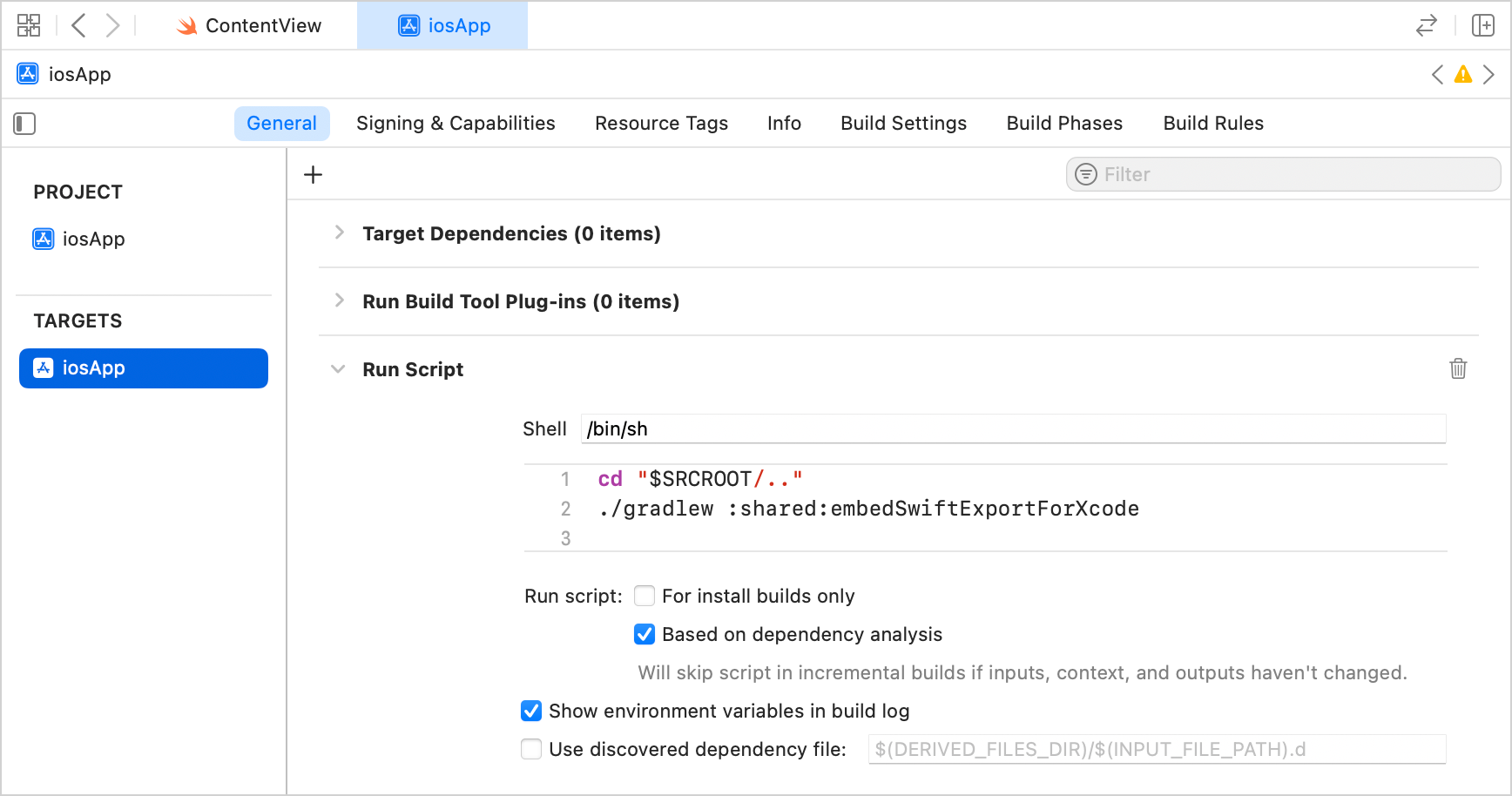
- 构建项目。构建会在输出目录中生成 Swift 模块。
目前的限制
Swift 导出目前仅在通过直接集成把 iOS framework 连接到 Xcode 项目的项目中可用。这是使用 IntelliJ IDEA 中的 Kotlin Multiplatform 插件或通过网页向导创建的 Kotlin Multiplatform 项目的标准配置。
其他已知问题:
- 继承自
List、Set 或 Map 的类型在导出时会被忽略(KT-80416)。 List、Set 或 Map 的继承者无法在 Swift 一侧实例化(KT-80417)。- 导出到 Swift 时,Kotlin 泛型类型参数会被类型擦除为其上界。
- 没有可用的 IDE 迁移提示或自动化工具。
- 当使用需要选择启用的声明时,你必须在 Gradle 构建文件的_模块级别_添加显式的
optIn 编译器选项。例如对于 kotlinx.datetime 库:
 1
 2
 3
 4
 5
 6
 7
 8
 9
10
11
12
13
| swiftExport {
moduleName = "Shared"
export("org.jetbrains.kotlinx:kotlinx-datetime:0.8.0") {
moduleName = "KotlinDateTime"
flattenPackage = "kotlinx.datetime"
}
}
// 在模块级别添加单独的选择启用块
compilerOptions {
optIn.add("kotlin.time.ExperimentalTime")
}
|
映射
下表展示了 Kotlin 概念如何映射到 Swift。
| Kotlin | Swift |
| class | class |
| object | 带 shared 属性的 class |
| enum class | enum |
| sealed 类和接口 | enum |
| typealias | typealias |
| 函数 | 函数 |
| suspend fun | async |
| kotlinx.coroutines flow | AsyncSequence |
| 属性 | 属性 |
| 构造器 | 初始化器 |
| 包 | 嵌套枚举 |
| Boolean | Bool |
| Char | Unicode.UTF16.CodeUnit |
| Byte | Int8 |
| Short | Int16 |
| Int | Int32 |
| Long | Int64 |
| UByte | UInt8 |
| UShort | UInt16 |
| UInt | UInt32 |
| ULong | UInt64 |
| Float | Float |
| Double | Double |
| Any | KotlinBase 类 |
| Unit | Void |
| Nothing | Never |
声明
类
Swift 导出只支持直接继承自 Any 的 final 类,例如 class Foo()。它们会被转换为继承自特殊 KotlinBase 类的 Swift 类:
1
2
3
4
5
6
| // Kotlin
class MyClass {
val property: Int = 0
fun method() {}
}
|
 1
 2
 3
 4
 5
 6
 7
 8
 9
10
11
12
13
14
| // Swift
public class MyClass : KotlinRuntime.KotlinBase {
public var property: Swift.Int32 {
get {
// ...
}
}
public override init() {
// ...
}
public func method() -> Swift.Void {
// ...
}
}
|
对象
对象会被转换为带私有 init 和静态 shared 访问器的 Swift 类:
1
2
3
4
5
6
7
8
9
10
11
| // Swift
public class O : KotlinRuntime.KotlinBase {
public static var shared: O {
get {
// ...
}
}
private override init() {
// ...
}
}
|
类型别名
Kotlin 类型别名会按原样导出:
1
2
| // Kotlin
typealias MyInt = Int
|
1
2
| // Swift
public typealias MyInt = Swift.Int32
|
枚举
Kotlin enum class 声明会作为常规的原生 Swift enum 类型导出:
1
2
3
4
5
6
7
8
| // Kotlin
enum class Color(val rgb: Int) {
RED(0xFF0000),
GREEN(0x00FF00),
BLUE(0x0000FF)
}
val color = Color.RED
|
1
2
3
4
5
6
| // Swift
public enum Color: Swift.CaseIterable, Swift.LosslessStringConvertible, Swift.RawRepresentable {
case RED, GREEN, BLUE
public var rgb: Swift.Int32 { get }
}
|
密封类与接口
Kotlin 中定义的密封层次结构会映射为 Swift 枚举,从而支持穷尽的 switch 语句。
Swift 导出会为每个密封类型生成一个 .sealedType() 方法。该方法返回一个 Swift 枚举,其 case 与密封层次结构的直接子类相对应。你可以嵌套这些调用以匹配更深层次的层次结构。
例如,在 Kotlin 中声明一个带类层次结构的密封接口:
 1
 2
 3
 4
 5
 6
 7
 8
 9
10
11
12
| // Kotlin
sealed interface Shape
class Circle : Shape {
override fun toString(): String = "Circle"
}
class Rectangle : Shape {
override fun toString(): String = "Rectangle"
}
fun createCircle(): Shape = Circle()
|
在 Swift 一侧,你可以使用不带 default 分支的穷尽 switch:
1
2
3
4
5
6
7
8
| // Swift
let shape = createCircle()
let name = switch shape.sealedType() {
case let .circle(type): "It's a \(type.value)"
case let .rectangle(type): "It's a \(type.value)"
}
// name == "It's a Circle"
|
由于该 switch 是穷尽的,如果密封层次结构中新增了子类,编译器会给出警告,因此你可以立即处理它,而无需依赖 switch 的 default 分支。
函数
Swift 导出支持简单的顶层函数和方法:
1
2
3
4
| // Kotlin
fun foo(a: Short, b: Bar) {}
fun baz(): Long = 0
|
1
2
3
4
5
6
7
8
| // Swift
public func foo(a: Swift.Int16, b: Bar) -> Swift.Void {
// ...
}
public func baz() -> Swift.Int64 {
// ...
}
|
对于 Kotlin 的扩展函数,接收者参数会变成位于第一位的普通 Swift 参数:
1
2
| // Kotlin
fun Int.foo(): Unit = TODO()
|
1
2
| // Swift
func foo(_ receiver: Int32) {}
|
Kotlin 中带 vararg 的函数会映射为 Swift 的可变参数函数参数:
1
2
| // Kotlin
fun log(vararg messages: String)
|
1
2
| // Swift
public func log(messages: Swift.String...)
|
注意:* 目前对带 operator 修饰符的函数的支持有限。* 泛型类型一般不受支持。
属性
Kotlin 属性会被转换为 Swift 属性:
1
2
3
4
5
6
| // Kotlin
val a: Int = 0
var b: Short = 15
const val c: Int = 0
|
 1
 2
 3
 4
 5
 6
 7
 8
 9
10
11
12
13
14
15
16
17
18
19
| // Swift
public var a: Swift.Int32 {
get {
// ...
}
}
public var b: Swift.Int16 {
get {
// ...
}
set {
// ...
}
}
public var c: Swift.Int32 {
get {
// ...
}
}
|
构造器
构造器会被转换为 Swift 初始化器:
1
2
| // Kotlin
class Foo(val prop: Int)
|
1
2
3
4
5
6
7
8
| // Swift
public class Foo : KotlinRuntime.KotlinBase {
public init(
prop: Swift.Int32
) {
// ...
}
}
|
类型
kotlin.Nothing
Kotlin 的 Nothing 类型会被转换为 Never 类型:
1
2
3
4
| // Kotlin
fun foo(): Nothing = TODO()
fun baz(input: Nothing) {}
|
1
2
3
4
5
6
7
8
| // Swift
public func foo() -> Swift.Never {
// ...
}
public func baz(input: Swift.Never) -> Void {
// ...
}
|
分类器类型
Swift 导出目前只支持直接继承自 Any 的 final 类。
包
Kotlin 包会被转换为嵌套的 Swift 枚举,以避免名称冲突:
1
2
3
| // Kotlin
// foo.bar 包中的 bar.kt 文件
fun callMeMaybe() {}
|
1
2
3
| // Kotlin
// foo.baz 包中的 baz.kt 文件
fun callMeMaybe() {}
|
1
2
3
4
5
6
7
8
9
10
11
12
13
14
| // Swift
public extension foo.bar {
public func callMeMaybe() {}
}
public extension foo.baz {
public func callMeMaybe() {}
}
public enum foo {
public enum bar {}
public enum baz {}
}
|
并发
挂起函数
你可以从 Swift 调用挂起的 Kotlin 代码。Kotlin 的挂起函数和挂起函数类型会导出为 Swift 的 async 对应形式:
1
2
3
4
5
| // Kotlin
suspend fun hello(): String {
delay(1000)
return "Hello Swift! This is Kotlin."
}
|
1
2
| // Swift
let msg = try await hello()
|
Flow
你还可以把 kotlinx.coroutines 的 flow 导出为 Swift 的 AsyncSequence:
1
2
3
| // Kotlin
// 导出 Flow 时保留 String 类型
fun flowOfStrings(): Flow<String> = flowOf("hello", "any", "world")
|
1
2
3
4
5
6
7
| // Swift
var actual: [String] = []
// 从 Kotlin 推断出 String 类型
for try await element in flowOfStrings().asAsyncSequence() {
actual.append(element)
}
|
协程调度器
默认情况下,当你从 Swift 调用 Kotlin 挂起函数或使用 asAsyncSequence 函数时,Kotlin 会创建一个使用 Dispatchers.Default 调度器的协程上下文,并在其中执行导出的代码。
要在其他调度器上运行导出的代码,请在 Kotlin 中使用 withContext() 函数切换协程上下文。例如:
1
2
3
4
| suspend fun runOnMain(): Int = withContext(Dispatchers.Main) {
delay(10L)
42
}
|
跨语言继承
Swift 导出支持跨语言继承。该特性的一个常见用例是反向导入模式:你在 Kotlin 中定义契约,并在 Swift 一侧提供平台特有的实现。当你需要使用无法直接导入 Kotlin 的纯 Swift 库时,这特别有用。
要实现这种模式,你需要声明一个 Kotlin 接口和一个 Swift 实现可以继承的 Kotlin 父类。然后你在 Swift 中实现该接口,并把该 Swift 对象传给接受该接口的 Kotlin 函数。例如,对于 CryptoKit 库:
- 在 Kotlin 一侧,声明一个接口、一个接受该接口的函数,以及一个
open 基类:
1
2
3
4
5
6
7
8
| // Kotlin
interface CryptoProvider {
fun hashMD5(input: String): String
}
fun processHash(provider: CryptoProvider, input: String): String = provider.hashMD5(input)
open class SwiftBase
|
- 在 Swift 一侧,继承导出的
SwiftBase 类,用纯 Swift 库实现该接口,并把该对象传回 Kotlin:
1
2
3
4
5
6
7
8
9
10
11
12
13
14
| // Swift
import CryptoKit
final class IosCryptoProvider: SwiftBase, CryptoProvider {
func hashMD5(input: String) -> String {
guard let data = input.data(using: .utf8) else { return "failed" }
return Insecure.MD5.hash(data: data).description
}
}
let provider = IosCryptoProvider()
// 调用 Kotlin 函数,后者会回调 Swift 中的 hashMD5()
print(processHash(provider: provider, input: "Hello, world!"))
|
当 Kotlin 接收到该 Swift 对象时,会把它当作普通 Kotlin 接口的实现来对待,直接调用 Swift 代码。
Swift 导出的演进
我们计划在未来的 Kotlin 版本中扩展并逐步稳定 Swift 导出,改善 Kotlin 与 Swift 之间的互操作。你可以留下你的反馈: