6.1.3 用 Kotlin 和 JUnit 测试 Java 代码 —— 教程
原文链接: https://kotlinlang.org/docs/jvm-test-using-junit.html
6.1.3 用 Kotlin 和 JUnit 测试 Java 代码 —— 教程
配置一个由 Maven 或 Gradle 构建的 Java 项目,以集成用 Kotlin 编写的 JUnit 测试。
Kotlin 与 Java 完全互操作,也就是说你可以用 Kotlin 为 Java 代码编写测试,并在同一个项目中与现有的 Java 测试一起运行。
在本教程中,你将学习如何:
- 配置一个 Java–Kotlin 混合项目,以使用 JUnit 运行测试。
- 添加用于验证 Java 代码的 Kotlin 测试。
- 使用 Maven 或 Gradle 运行测试。
注意: 开始之前,请确认你已安装:* IntelliJ IDEA 或安装了 Kotlin 扩展的 VS Code。* Java 17 或更高版本。
- 在 IDE 中,从版本控制克隆示例项目:
1
| https://github.com/kotlin-hands-on/kotlin-junit-sample.git
|
- 进入
initial 模块并查看项目结构:
1
2
3
4
5
6
7
| kotlin-junit-sample/
├── initial/
│ ├── src/
│ │ ├── main/java/ # Java source code
│ │ └── test/java/ # JUnit test in Java
│ ├── pom.xml # Maven configuration
│ └── build.gradle.kts # Gradle configuration
|
initial 模块包含一个用 Java 编写的简单 Todo 应用,以及一个测试。
- 在同一个目录中打开构建文件,并更新其内容以支持 Kotlin:
Maven
pom.xml 文件
- 在
<properties> 部分设置 Kotlin 版本。 - 在
<dependencies> 部分添加 JUnit Jupiter 依赖以运行测试。 - 在
<build><plugins> 部分应用 kotlin-maven-plugin,并把 <extensions> 设为 true。它会自动向构建添加相应的执行配置和 kotlin-stdlib 依赖。 - 在使用带 extensions 的 Kotlin Maven 插件时,不需要把
maven-compiler-plugin 添加到 <build><pluginManagement> 部分。
Gradle
 1
 2
 3
 4
 5
 6
 7
 8
 9
10
11
12
13
14
15
16
17
18
19
20
21
22
23
24
25
26
27
28
29
30
31
32
33
34
35
36
| // build.gradle.kts
group = "org.jetbrains.kotlin"
version = "1.0-SNAPSHOT"
description = "kotlin-junit-complete"
java.sourceCompatibility = JavaVersion.VERSION_17
plugins {
application
kotlin("jvm") version "2.4.20"
}
kotlin {
jvmToolchain(17)
}
application {
mainClass.set("org.jetbrains.kotlin.junit.App")
}
repositories {
mavenCentral()
}
dependencies {
implementation("com.gitlab.klamonte:jexer:1.6.0")
testImplementation(kotlin("test"))
testImplementation(libs.org.junit.jupiter.junit.jupiter.api)
testImplementation(libs.org.junit.jupiter.junit.jupiter.params)
testRuntimeOnly(libs.org.junit.jupiter.junit.jupiter.engine)
testRuntimeOnly(libs.org.junit.platform.junit.platform.launcher)
}
tasks.test {
useJUnitPlatform()
}
|
build.gradle.kts
- 在
plugins {} 块中添加 kotlin("jvm") 插件。 - 设置 JVM 工具链版本,使其与你的 Java 版本一致。
- 在
dependencies {} 块中添加 kotlin.test 库,它提供 Kotlin 的测试工具并与 JUnit 集成。
Kotlin/JVM 支持最新的稳定 JUnit 版本,即 JUnit 6。你可以在 gradle/libs.versions.toml 版本目录中找到它。
如果你习惯使用版本目录,甚至可以在其中添加 kotlin("jvm") 插件:
 1
 2
 3
 4
 5
 6
 7
 8
 9
10
11
12
13
| # gradle/libs.versions.toml
[versions]
kotlin = "2.4.20"
junit = "6.0.3"
[libraries]
org-junit-jupiter-junit-jupiter-api = { module = "org.junit.jupiter:junit-jupiter-api", version.ref = "junit" }
org-junit-jupiter-junit-jupiter-params = { module = "org.junit.jupiter:junit-jupiter-params", version.ref = "junit" }
org-junit-jupiter-junit-jupiter-engine = { module = "org.junit.jupiter:junit-jupiter-engine", version.ref = "junit" }
org-junit-platform-junit-platform-launcher = { module = "org.junit.platform:junit-platform-launcher" }
[plugins]
kotlinJvm = { id = "org.jetbrains.kotlin.jvm", version.ref = "kotlin" }
|
libs.versions.toml
- 在 IDE 中重新加载构建文件。
关于构建文件配置的更详细说明,请参阅项目配置。
添加你的第一个 Kotlin 测试
initial/src/test/java 中的 TodoItemTest.java 测试已经验证了应用的基本功能:条目创建、默认值、唯一 ID 以及状态变化。
你可以通过添加一个验证仓库层行为的 Kotlin 测试来扩大测试覆盖率:
- 进入同一个测试源目录
initial/src/test/java。 - 在与 Java 测试相同的包中创建
TodoRepositoryTest.kt 文件。 - 创建带字段声明和 setup 函数的测试类:
 1
 2
 3
 4
 5
 6
 7
 8
 9
10
11
12
13
14
15
16
17
18
19
| package org.jetbrains.kotlin.junit
import org.junit.jupiter.api.BeforeEach
import org.junit.jupiter.api.Assertions
import org.junit.jupiter.api.Test
import org.junit.jupiter.api.DisplayName
internal class TodoRepositoryTest {
lateinit var repository: TodoRepository
lateinit var testItem1: TodoItem
lateinit var testItem2: TodoItem
@BeforeEach
fun setUp() {
repository = TodoRepository()
testItem1 = TodoItem("Task 1", "Description 1")
testItem2 = TodoItem("Task 2", "Description 2")
}
}
|
- JUnit 注解在 Kotlin 中的用法与 Java 相同。
- 在 Kotlin 中,
lateinit 关键字允许声明稍后初始化的非空属性。这有助于避免在测试中使用可空类型(TodoRepository?)。
- 在
TodoRepositoryTest 类中添加一个测试,检查仓库的初始状态及其大小:
1
2
3
4
5
6
| @Test
@DisplayName("Should start with empty repository")
fun shouldStartEmpty() {
Assertions.assertEquals(0, repository.size())
Assertions.assertTrue(repository.all.isEmpty())
}
|
- 与 Java 的静态导入不同,Jupiter 的
Assertions 是作为类导入,并作为断言函数的限定符使用。 - 在 Kotlin 中,你不必调用
.getAll(),而是可以把 Java getter 当作属性访问,即 repository.all。
- 再写一个测试,验证所有条目的复制行为:
 1
 2
 3
 4
 5
 6
 7
 8
 9
10
11
12
13
14
| @Test
@DisplayName("Should return defensive copy of items")
fun shouldReturnDefensiveCopy() {
repository.add(testItem1)
val items1 = repository.all
val items2 = repository.all
Assertions.assertNotSame(items1, items2)
Assertions.assertThrows(
UnsupportedOperationException::class.java
) { items1.clear() }
Assertions.assertEquals(1, repository.size())
}
|
- 要从 Kotlin 类获取 Java 类对象,请使用
::class.java。 - 你可以把复杂的断言拆成多行,而不需要使用任何特殊的续行字符。
- 添加一个测试,验证按 ID 查找条目:
 1
 2
 3
 4
 5
 6
 7
 8
 9
10
11
| @Test
@DisplayName("Should find item by ID")
fun shouldFindItemById() {
repository.add(testItem1)
repository.add(testItem2)
val found = repository.getById(testItem1.id())
Assertions.assertTrue(found.isPresent)
Assertions.assertEquals(testItem1, found.get())
}
|
Kotlin 与 Java 的 Optional API 配合顺畅。它会自动把 getter 方法转换为属性,因此这里的 isPresent() 方法是作为属性访问的。
- 编写一个测试,验证条目移除机制:
 1
 2
 3
 4
 5
 6
 7
 8
 9
10
11
12
13
14
15
16
17
18
19
20
21
22
23
24
| @Test
@DisplayName("Should remove item by ID")
fun shouldRemoveItemById() {
repository.add(testItem1)
repository.add(testItem2)
val removed = repository.remove(testItem1.id())
Assertions.assertTrue(removed)
Assertions.assertEquals(1, repository.size())
Assertions.assertTrue(repository.getById(testItem1.id()).isEmpty)
Assertions.assertTrue(repository.getById(testItem2.id()).isPresent)
}
@Test
@DisplayName("Should return false when removing non-existent item")
fun shouldReturnFalseForNonExistentRemoval() {
repository.add(testItem1)
val removed = repository.remove("non-existent-id")
Assertions.assertFalse(removed)
Assertions.assertEquals(1, repository.size())
}
|
在 Kotlin 中,你可以链式调用方法和属性访问,例如 repository.getById(id).isEmpty。
提示: 你可以在 TodoRepositoryTest 测试类中添加更多测试,以覆盖更多功能。完整源码见示例项目的 complete 模块。
运行测试
同时运行 Java 和 Kotlin 测试,以验证项目按预期工作:
- 使用行号旁的图标运行测试:
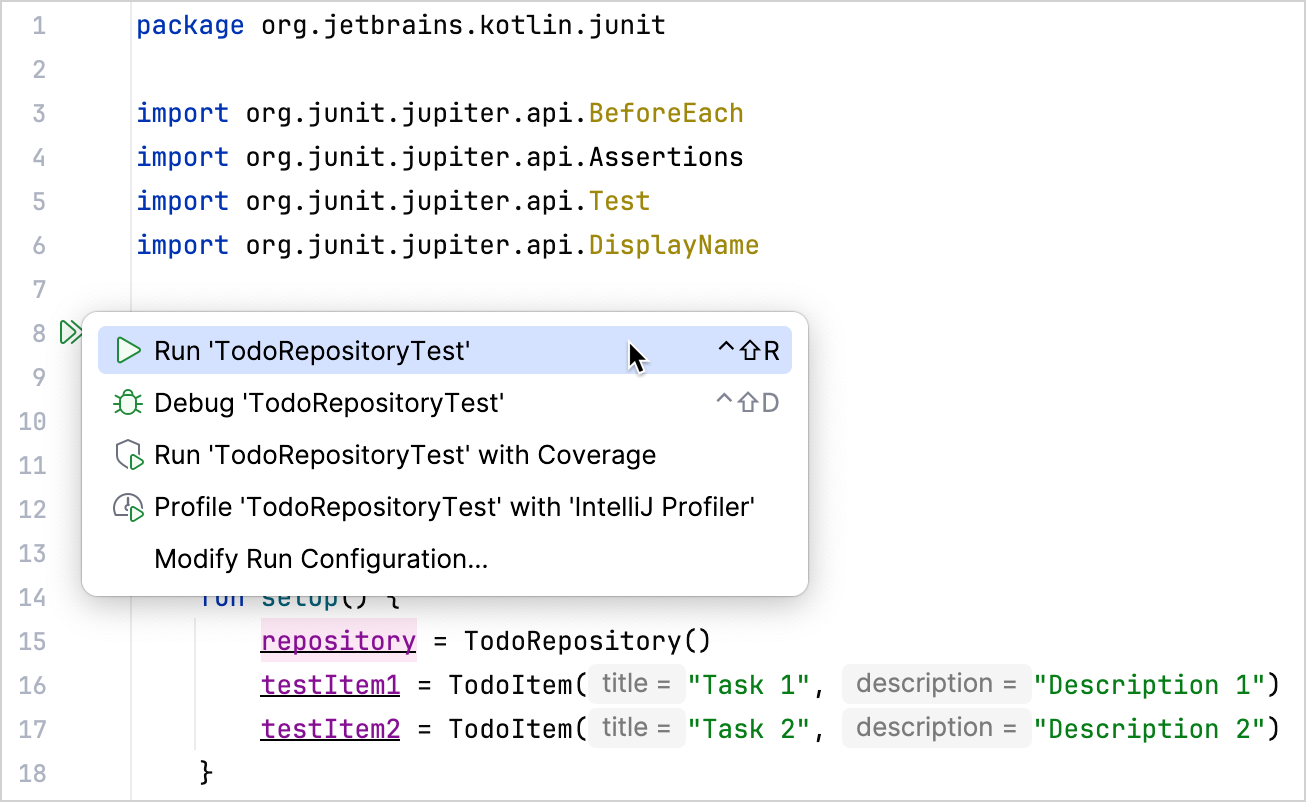
你也可以在 initial 目录中使用命令行运行项目中的所有测试:
Maven
Gradle
- 通过修改某个变量值来检查测试是否正常工作。例如,把
shouldAddItem 测试改为期望一个不正确的仓库大小:
1
2
3
4
5
6
7
8
| @Test
@DisplayName("Should add item to repository")
fun shouldAddItem() {
repository.add(testItem1)
Assertions.assertEquals(2, repository.size()) // 从 1 改为 2
Assertions.assertTrue(repository.all.contains(testItem1))
}
|
- 再次运行测试,确认它失败了:
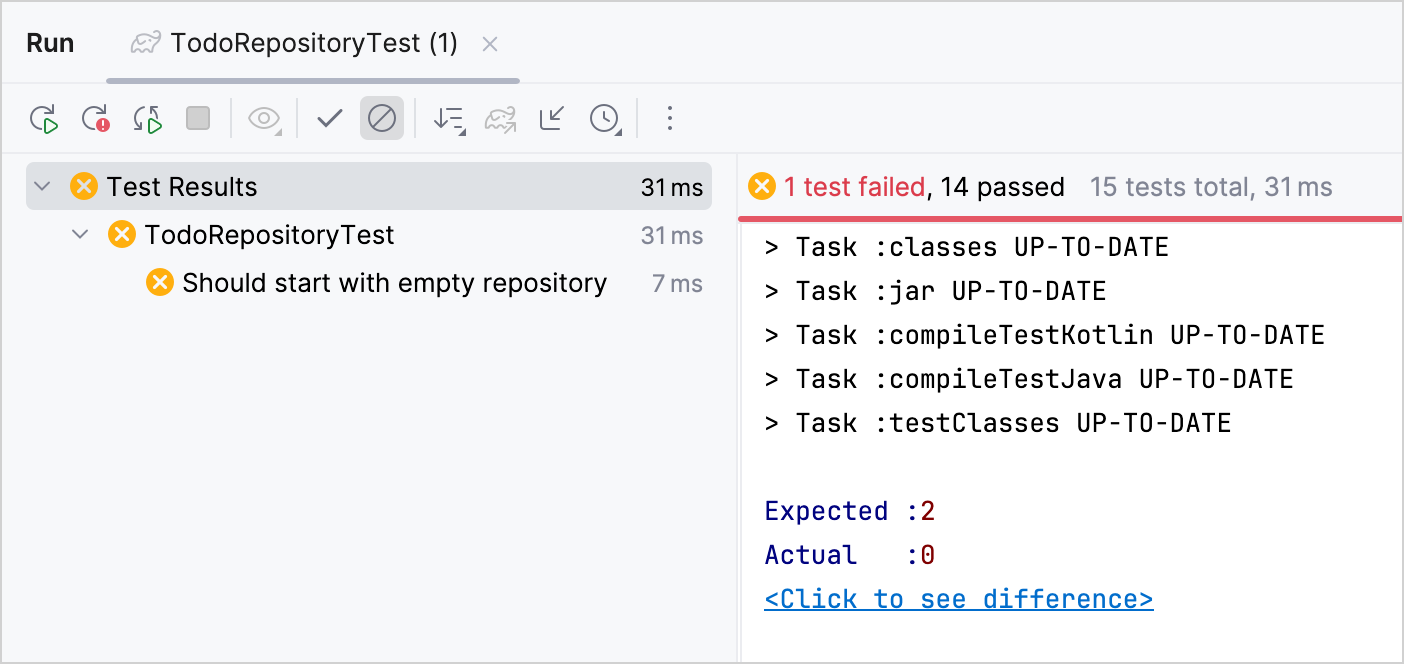
提示: 你可以在示例项目的 complete 模块中找到配置完整、包含测试的项目。
接下来学什么
进一步了解用 Maven 测试 Kotlin 项目。