Get started
4 分钟阅读
OpenClaw

“EXFOLIATE! EXFOLIATE!” — A space lobster, probably
“去角质!去角质!”—— 大概是一只太空龙虾说的
Any OS gateway for AI agents across WhatsApp, Telegram, Discord, iMessage, and more.
一款可跨 WhatsApp、Telegram、Discord、iMessage 等平台使用、适配任意操作系统的 AI 智能体网关
Send a message, get an agent response from your pocket. Plugins add Mattermost and more.
发送一条消息,就能在手机上收到智能体的回复。插件可接入 Mattermost 等平台。
Get Started
Install OpenClaw and bring up the Gateway in minutes.
几分钟内安装 OpenClaw 并启动 Gateway 。
Run Onboarding
Guided setup with openclaw onboard and pairing flows.
通过openclaw onboard引导式设置和配对流程完成设置。
Open the Control UI
Launch the browser dashboard for chat, config, and sessions.
启动浏览器仪表板以进行聊天、配置和会话管理。
What is OpenClaw?
OpenClaw is a self-hosted gateway that connects your favorite chat apps — WhatsApp, Telegram, Discord, iMessage, and more — to AI coding agents like Pi. You run a single Gateway process on your own machine (or a server), and it becomes the bridge between your messaging apps and an always-available AI assistant.
OpenClaw 是一款自托管网关,可将你常用的聊天应用程序(WhatsApp、Telegram、Discord、iMessage 等)与 Pi 等人工智能编程智能体连接起来。你只需在自己的设备(或服务器)上运行一个网关进程,它就能成为你的消息应用与随时可用的人工智能助手之间的桥梁。
Who is it for? Developers and power users who want a personal AI assistant they can message from anywhere — without giving up control of their data or relying on a hosted service.What makes it different?
适用人群? 开发者和高级用户,他们想要一款个人人工智能助手,可随时随地与之发消息——同时又不会放弃对自身数据的控制权,也无需依赖托管服务。
- Self-hosted: runs on your hardware, your rules
- 自托管:运行在你的硬件上,由你制定规则
- Multi-channel: one Gateway serves WhatsApp, Telegram, Discord, and more simultaneously
- 多渠道:一个网关可同时服务 WhatsApp、Telegram、Discord 等平台
- Agent-native: built for coding agents with tool use, sessions, memory, and multi-agent routing
- 原生智能体:专为支持工具使用、会话、记忆和多智能体路由的编码智能体而构建
- Open source: MIT licensed, community-driven
- 开源:基于 MIT 许可证授权,由社区驱动
What do you need? Node 24 (recommended), or Node 22 LTS (22.14+) for compatibility, an API key from your chosen provider, and 5 minutes. For best quality and security, use the strongest latest-generation model available.
你需要什么? 推荐使用 Node 24,或兼容的 Node 22 长期支持版(22.14+)、你所选服务商的 API 密钥,以及 5 分钟时间。为获得最佳质量和安全性,请使用当前最新一代的最强性能模型。
How it works
flowchart LR
  A["Chat apps + plugins"] --> B["Gateway"]
  B --> C["Pi agent"]
  B --> D["CLI"]
  B --> E["Web Control UI"]
  B --> F["macOS app"]
  B --> G["iOS and Android nodes"]
The Gateway is the single source of truth for sessions, routing, and channel connections.
Gateway 是会话、路由和 channel 连接的唯一真实来源。
Key capabilities 核心功能
Multi-channel gateway
WhatsApp, Telegram, Discord, and iMessage with a single Gateway process.
通过单一Gateway 进程连接 WhatsApp、Telegram、Discord 和 iMessage
Plugin channels
Add Mattermost and more with extension packages.
通过扩展包添加 Mattermost 及其他应用。
Multi-agent routing
Isolated sessions per agent, workspace, or sender.
每个智能体、工作区或发送方的独立会话
Media support
Send and receive images, audio, and documents.
收发图片、音频和文档
Web Control UI
Browser dashboard for chat, config, sessions, and nodes.
用于聊天、配置、会话和节点的浏览器控制面板
Mobile nodes
Pair iOS and Android nodes for Canvas, camera, and voice-enabled workflows.
将 iOS 和 Android 节点配对,以支持画布、摄像头和语音驱动的工作流程。
Quick start
- Install OpenClaw
npm install -g openclaw@latest
- Onboard and install the service
openclaw onboard --install-daemon
- Chat
Open the Control UI in your browser and send a message:
在浏览器中打开控制界面并发送一条消息:
openclaw dashboard
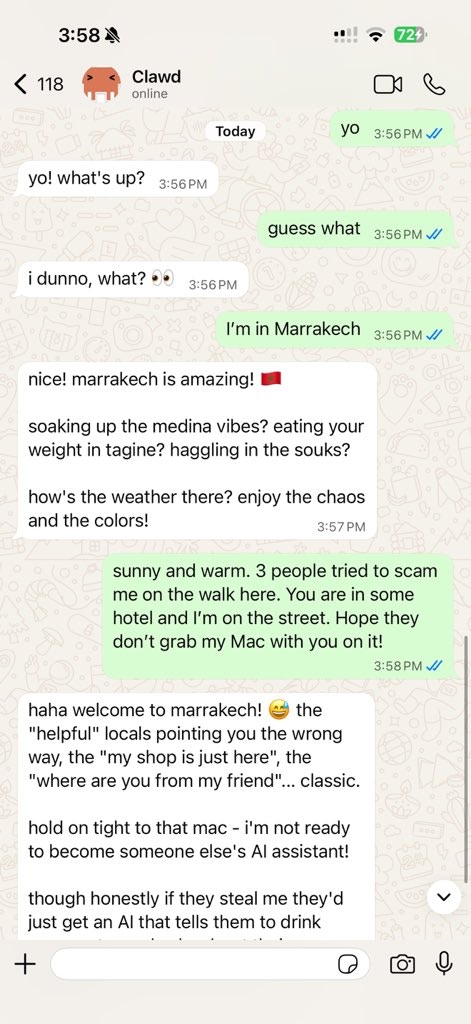
Or connect a channel (Telegram is fastest) and chat from your phone.
或者连接一个渠道(Telegram 速度最快),然后用你的手机进行聊天。
Need the full install and dev setup? See Getting Started.
需要完整的安装和开发环境设置吗?请查看快速开始。
Dashboard
Open the browser Control UI after the Gateway starts.
Gateway 启动后打开浏览器控制界面。
- Local default: http://127.0.0.1:18789/
- Remote access: Web surfaces and Tailscale
Configuration (optional)
Config lives at ~/.openclaw/openclaw.json.
配置文件位于 ~/.openclaw/openclaw.json。
- If you do nothing, OpenClaw uses the bundled Pi binary in RPC mode with per-sender sessions.
- 如果你什么都不做,OpenClaw 会以 RPC 模式使用捆绑的 Pi 二进制文件,并采用按发送方会话的方式。
- If you want to lock it down, start with
channels.whatsapp.allowFromand (for groups) mention rules. - 如果你想锁定它,先从
channels.whatsapp.allowFrom开始,并且(针对群组)提及相关规则。
Example:
| |
Start here
Docs hubs
All docs and guides, organized by use case.
所有文档和指南均按使用场景分类。
Configuration
Core Gateway settings, tokens, and provider config.
核心 Gateway 设置、tokens 和提供商配置
Remote access
SSH and tailnet access patterns.
SSH 和 tailnet 访问模式
Channels
Channel-specific setup for WhatsApp, Telegram, Discord, and more.
WhatsApp、Telegram、Discord 等渠道的专属设置
Nodes
iOS and Android nodes with pairing, Canvas, camera, and device actions.
支持配对、Canvas、摄像头及设备操作的iOS和Android节点
Help
Common fixes and troubleshooting entry point.
常见修复与故障排除入口。
Learn more
Full feature list
Complete channel, routing, and media capabilities.
完整的频道、路由和媒体功能。
Multi-agent routing
Workspace isolation and per-agent sessions.
工作区隔离与单代理会话。
Security
Tokens, allowlists, and safety controls.
Tokens、白名单和安全控制。
Troubleshooting 故障排除
Gateway diagnostics and common errors.
Gateway 诊断和常见错误。
About and credits 关于和致谢
Project origins, contributors, and license.
项目起源、贡献者与许可证。